
Windows 10/11 File Extensions: Complete Guide 2025
Complete guide to Windows 10 & 11 file extensions: .exe, .docx, .pdf, .jpg, .mp4, .zip & more. Learn to identify and manage your files safely.
EN - TUTORIAL
Quebec Test
12/3/20253 min read
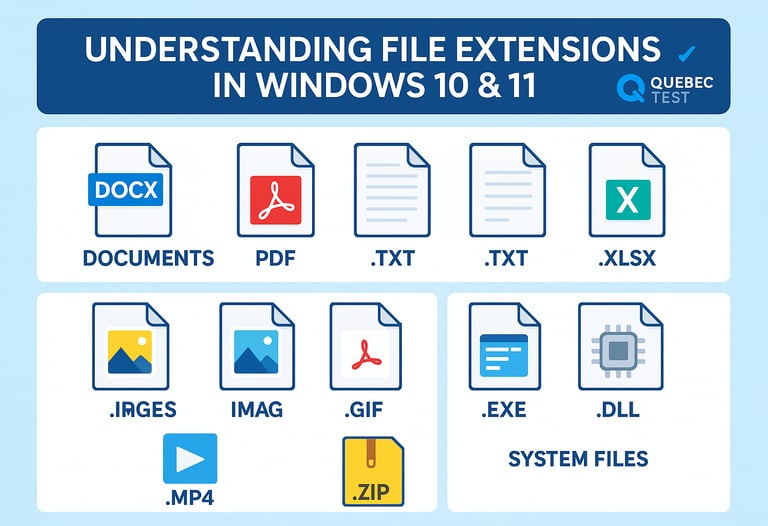
File extensions are essential for understanding how Windows manages your documents and programs. This guide details the main extensions you'll encounter daily on your operating system.
What is a File Extension?
A file extension is a suffix of 3 to 4 letters (sometimes more) that follows the period in a filename, such as .docx in report.docx. It tells Windows what type of file it is and which program to use to open it.
Program and Executable Extensions
.EXE (Executable)
The most common format for Windows applications. When you double-click an .exe file, Windows launches the corresponding program. Examples: chrome.exe, photoshop.exe.
.MSI (Microsoft Installer)
Program installation files that use Windows' built-in installation system. More structured than .exe files for installations, they allow for clean uninstallation through Control Panel.
.BAT (Batch)
Scripts containing a series of MS-DOS commands executed sequentially. Useful for automating repetitive tasks.
.CMD (Command Script)
Similar to .bat files, but designed specifically for the modern Windows command prompt.
.PS1 (PowerShell Script)
Scripts written in PowerShell language, offering advanced automation capabilities in Windows.
.DLL (Dynamic Link Library)
Code libraries shared by multiple programs. Cannot be executed directly, but are essential for application functionality.
Office Document Extensions
.DOCX and .DOC
Microsoft Word formats. The .docx is the modern version (since Office 2007), while .doc is the older format.
.XLSX and .XLS
Microsoft Excel formats for spreadsheets. The .xlsx is the current format, .xls corresponds to older versions.
.PPTX and .PPT
Microsoft PowerPoint formats for presentations. Same evolution as Word and Excel formats.
.PDF (Portable Document Format)
Universal Adobe format that preserves layout across all systems. Windows 10 and 11 can open PDFs natively with Edge.
.TXT (Text)
Plain text files without formatting, opened by default with Notepad.
.RTF (Rich Text Format)
Rich text format compatible with most word processors, maintaining basic formatting.
Image Extensions
.JPG or .JPEG (Joint Photographic Experts Group)
Compressed image format ideal for photos. Very common on the web and digital cameras.
.PNG (Portable Network Graphics)
Image format with transparency support, ideal for graphics and logos. Better quality than JPEG for illustrations.
.GIF (Graphics Interchange Format)
Format supporting simple animations, limited to 256 colors.
.BMP (Bitmap)
Uncompressed Windows image format, resulting in large but high-quality files.
.SVG (Scalable Vector Graphics)
Vector image format that can be resized without quality loss.
.ICO (Icon)
Specific format for Windows icons.
Video Extensions
.MP4 (MPEG-4 Part 14)
The most popular video format, offering a good balance between quality and file size. Native playback in Windows.
.AVI (Audio Video Interleave)
Old Microsoft video format, still widely used.
.MOV (QuickTime Movie)
Format developed by Apple, but playable on Windows with appropriate codecs.
.WMV (Windows Media Video)
Microsoft proprietary video format, optimized for Windows.
.MKV (Matroska Video)
Open-source video container supporting multiple audio tracks and subtitles.
Audio Extensions
.MP3 (MPEG Audio Layer 3)
Most widespread compressed audio format, excellent quality/size compromise.
.WAV (Waveform Audio File)
Uncompressed high-quality audio format, large files.
.WMA (Windows Media Audio)
Microsoft audio format, alternative to MP3.
.FLAC (Free Lossless Audio Codec)
Compressed audio format without quality loss, appreciated by audiophiles.
.AAC (Advanced Audio Coding)
Modern audio format offering better quality than MP3 at equivalent bitrate.
Compressed Archive Extensions
.ZIP
Most common compression format, natively supported by Windows 10 and 11.
.RAR
Popular compression format requiring third-party software like WinRAR or 7-Zip.
.7Z
Open-source compression format offering excellent compression rates via 7-Zip.
.TAR and .GZ
Archive formats commonly used on Linux, but readable on Windows with appropriate tools.
Windows System Extensions
.SYS (System File)
System files essential for Windows operation and hardware drivers.
.INI (Initialization)
Configuration files containing application settings.
.REG (Registry)
Files containing modifications for the Windows Registry. Handle with caution.
.LOG
Log files recording system or application events and errors.
.TMP (Temporary)
Temporary files created by Windows and applications, usually deletable.
Web Extensions
.HTML and .HTM (HyperText Markup Language)
Web pages opening in your default browser.
.CSS (Cascading Style Sheets)
Formatting files for web pages.
.JS (JavaScript)
Scripts adding interactivity to web pages.
.PHP
Server-side script files for dynamic websites.
Database Extensions
.DB, .DBF
Generic database files.
.MDB and .ACCDB
Microsoft Access database formats.
.SQL
Files containing SQL database queries or structures.
Security Tips
Beware of double extensions: Malicious files sometimes disguise themselves with names like document.pdf.exe. Windows can hide extensions by default, making the suspicious file invisible.
To display extensions in Windows 10/11:
Open File Explorer
Click on the "View" tab
Check "File name extensions"
Beware of dangerous extensions: Files with .exe, .bat, .cmd, .scr, .vbs received by email or downloaded from dubious sources may contain viruses.
Conclusion
Understanding file extensions helps you better manage your documents, identify file types, and spot potential threats. Windows 10 and 11 automatically handle most of these formats, but knowing their meaning remains essential for effective and secure use of your computer.
Don't hesitate to enable extension display in Windows Explorer to always know what type of file you're working with.