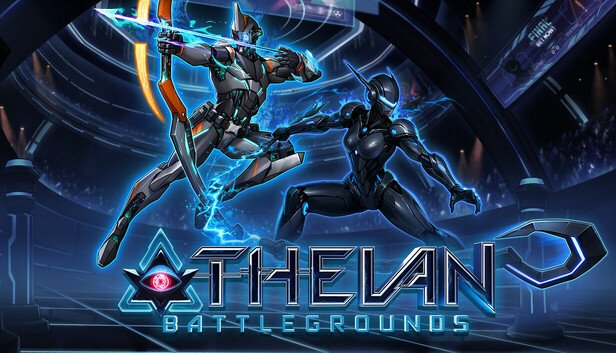
In Athelan Battlegrounds, the big decision each turn is which champion should act. Advance the character who can reach your opponent, and you may leave someone else exposed. Move a vulnerable champion out of the way, and you may have to give up a chance to attack. That trade-off is the starting point for Athelan Games’ free-to-play PC tactics game. Steam lists November 25 as its planned release date and identifies English and French interface support.

Read both sides of the board before you move
The studio describes turns in which you choose a champion who can move and use one of their two abilities. Position, ability cooldowns, and the order in which you commit to a move all matter. Before making your first attack, look at where the chosen champion will end up. Ask which opponents could reach that position and which teammates would be close enough to help. A move that looks strong at first can create a problem that is harder to solve on the following turn.
For a first match, try predicting just one reply. You do not need to see the entire game unfold in your head. If an opponent could move into a useful position after you advance, compare your plan with the option of staying back. If you decide to advance anyway, remember why. After the opponent replies, you can ask whether your reasoning was sound even if the outcome was different from what you expected.
Cooldowns are another way to think about timing. When one of your preferred abilities is unavailable, consider whether moving that champion still helps or whether another character has a better job to do. Watching for this choice is easier than trying to memorize every number at once. In your next match, look for the first turn in which a cooldown changed your plan.
Build a team you can learn
Athelan Games says you can select champions, place them on your side of the board and save your team compositions. You can also use duplicates of champions. That gives you room to experiment, but it is worth keeping the same team long enough to see how it behaves. If you replace every champion after each loss, it becomes difficult to tell whether the problem was your team, your starting position or the way you used a particular ability.
Change one thing next. If the same champion is regularly exposed, try moving its starting position. If you consistently struggle to reach an opponent, test a different combination of abilities. Keep a saved version of the first team so you can go back and compare without rebuilding it. The goal is to learn something you can apply again, even if the change does not immediately lead to a win.
If you are learning alongside a friend, compare one turn after the match. Explain what you thought the other person would do and what actually happened. You may discover that each of you was watching a different part of the board. That gives you a better idea of what to look for next time than simply reviewing the final score.
The puzzle editor gives you another way to practise
The studio also describes an editor for creating and sharing puzzles. Those puzzles can set different objectives from competitive matches. If you prefer to understand one interaction at a time, a limited puzzle is a good place to practise looking ahead. Start from the position you want to reach and work backwards. Ask what would need to be true a turn earlier. When an attempt fails, look for the moment at which your plan became harder to recover.
Players coming from chess may recognize the habit of asking what their move makes possible for someone else. Athelan adds variable teams and abilities, so that analogy only goes so far. Players coming from real-time strategy may notice the slower cadence first. A turn gives you time to compare two ideas, including a move you might overlook when you are also trying to react quickly.
What to check before installing
- Availability: look for the install option on the Steam page. The listed release date and the actual unlock can differ by time zone or storefront status.
- PC requirements: check your Windows version and graphics hardware against the current listing. Confirm any unusual figures with the developer before using them to plan an upgrade.
- Purchases: Steam lists in-app purchases. The developer describes those offers as cosmetic, including champion and board appearances.
- Modes: the listing includes online competitive play. Review the listed modes if you intend to play mainly on your own or are specifically looking for a way to play with friends.
Keep early matches comparable
Try a few matches with the same lineup before you decide how well a particular champion fits your approach. One opponent may leave an opening that another never offers. An ability that seemed decisive in one match may work only because of where the other team started. When you remember a strong result, remember the position around it as well. That makes it easier to tell whether the move is something you can repeat.
It can also help to separate the choices you make before a match from those you make during it. Starting placement is something you can revisit without changing the team. During play, your priorities can change with each turn. Keep a short note of which of those two decisions you would change next time.
Set one goal for your first session
Finish a match and pick one move you can explain. Perhaps you moved a champion into a position that gave the rest of the team room to act, or saved an ability until a better opportunity appeared. Then choose one decision to revisit, rather than changing everything before the next match. If you enjoy that process, you will probably understand the appeal of a tactics game that puts the emphasis on decisions made during play.